1- Project Overview
Designing for bilingual, bidirectional languages is notoriously challenging—especially when switching between English (LTR) and Arabic (RTL). Manual translation, layout flipping, and font adjustments slow teams down, introduce inconsistencies, and break design systems.
To address this, I built a Figma plugin that performs intelligent EN ↔ AR translation with full RTL support and deep design-system awareness. The plugin handles everything from text translation to component variants, text-style mapping, layout direction, and icon mirroring—all while preserving overrides and respecting Figma constraints.
What the Plugin Does?
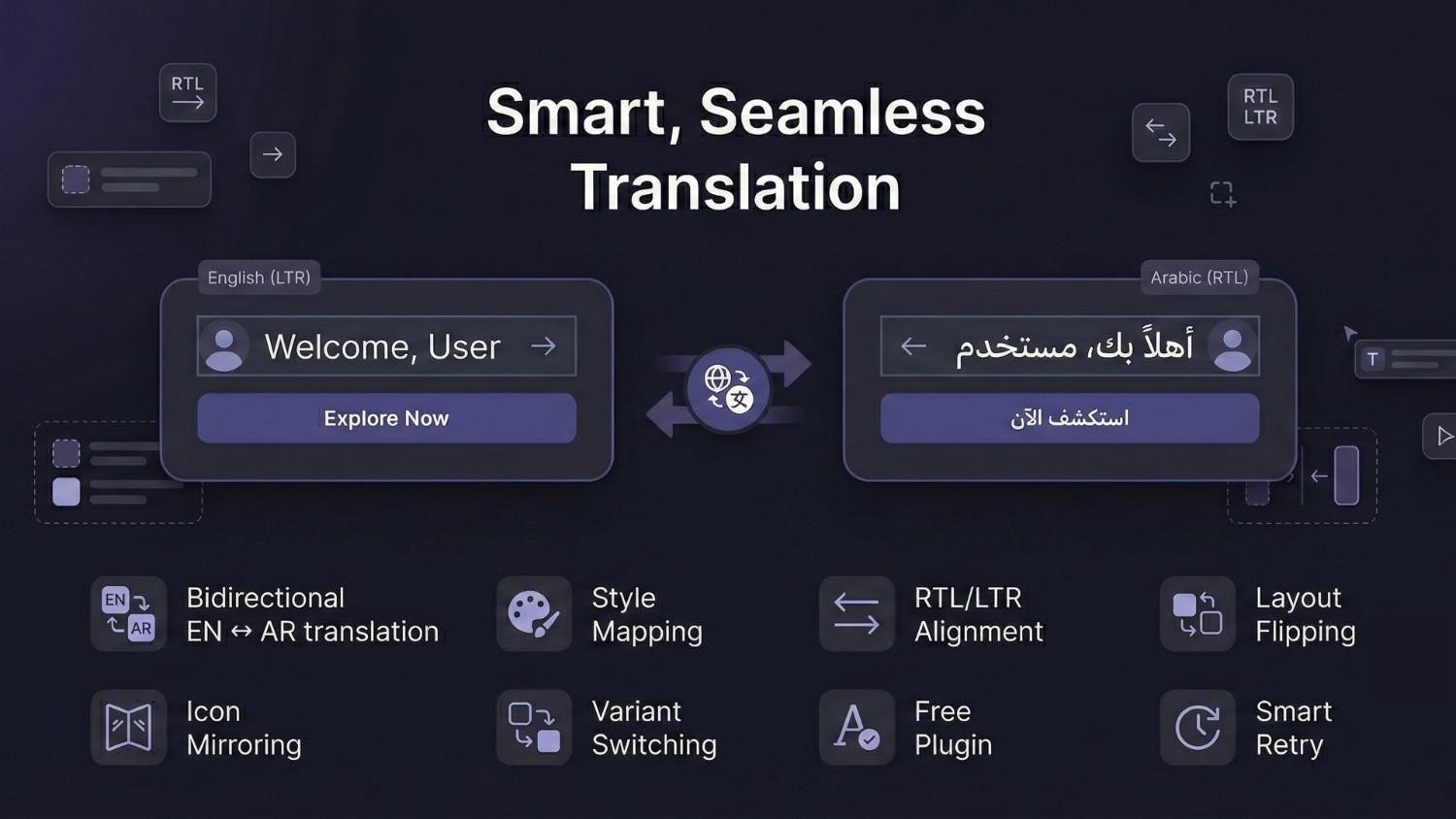
EN ↔ AR translation.
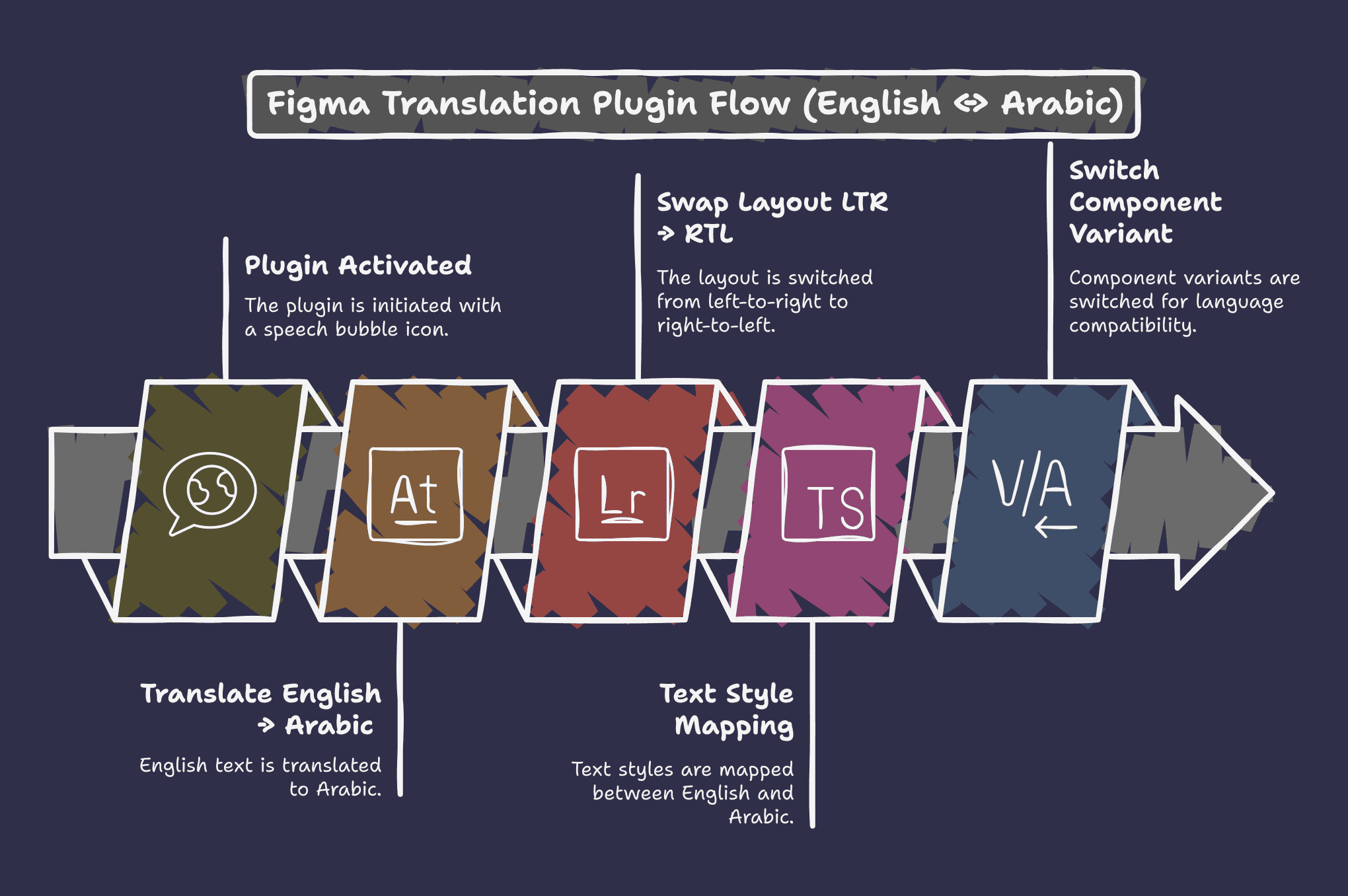
Text style mapping (EN H1 → AR H1, EN Body → AR Body, etc.).
RTL/LTR automatic alignment.
Layout direction flipping.
Icon mirroring.
Component variant switching.
Retry logic for API throttling.
Fallback fonts if no Arabic style exists.
Impact:
This plugin dramatically reduces localization time—from hours of manual editing to seconds. It ensures consistent typography, responsive layouts, and accurate bidirectional presentation.
2- My Role & Responsibilities
As a Senior UX Designer, I led the end-to-end experience:
Defined the problem space and user goals.
Conducted competitive analysis.
Identified technical constraints of Figma's API.
Designed the UX flows and interaction model.
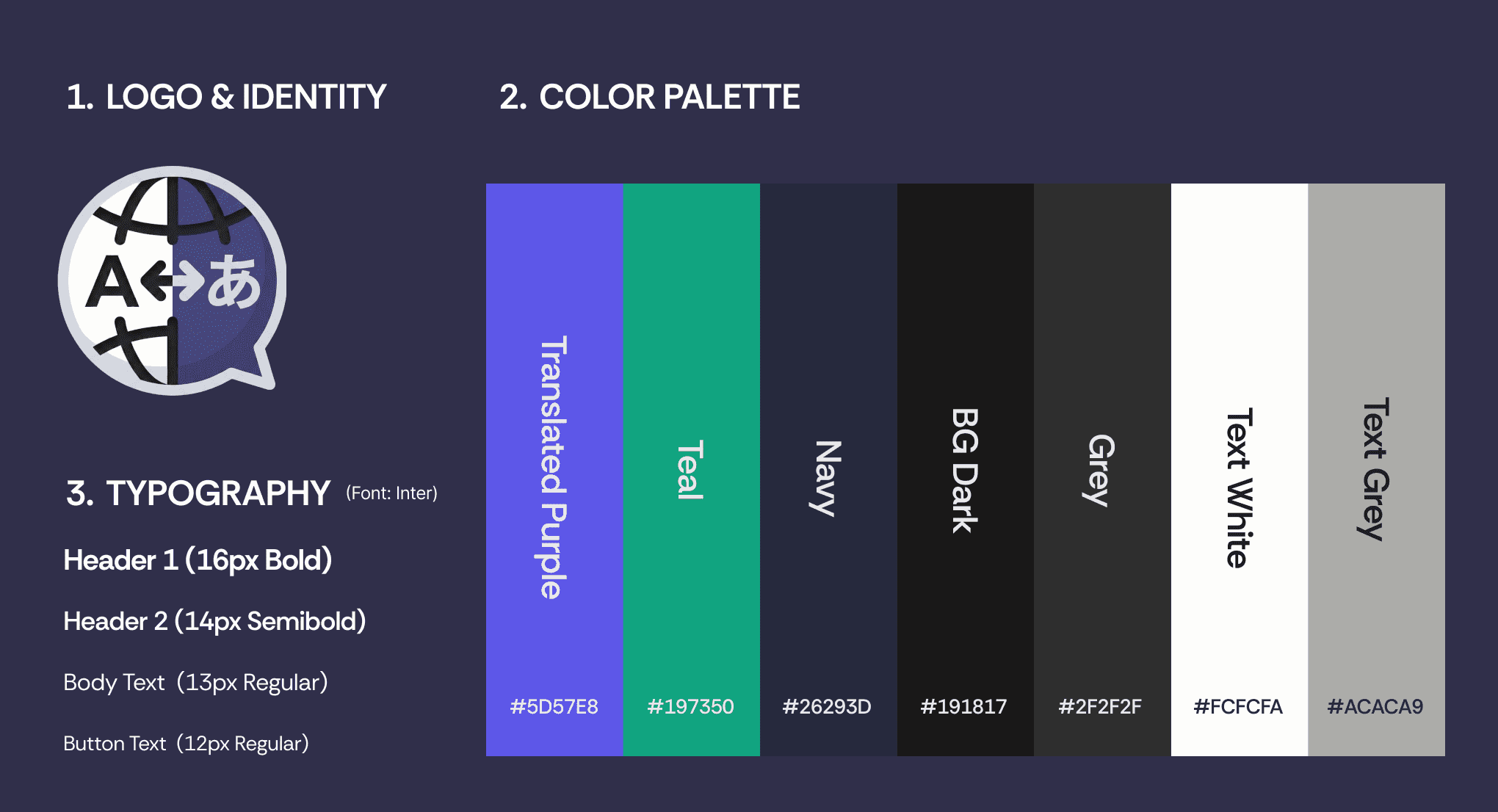
Created the visual identity, plugin icon, and hero image.
Architected the translation engine logic with AI assistance.
Managed iterative development using ChatGPT + Claude + Gemini.
Validated functionality using real designs.
This case study demonstrates my ability to operate as a strategic product thinker, technical UX designer, and problem-solving partner alongside engineering.
3- The Hidden Cost of Localization
Most design system leaders face this paradox: as your product scales to new markets, your design system becomes increasingly fragile. When Figma teams attempt to localize designs for RTL languages like Arabic, they hit a wall—existing localization tools force an impossible choice:
Either preserve component integrity OR achieve proper RTL layout. Not both.
This wasn't just an inconvenience. It meant:
Design system governance breaks down (components get detached, instances corrupted)
Manual rework cascades across handoff (devs can't trust the design, designers re-do work)
Localization becomes a project blocker, not a systematic capability
Teams working in multiple languages operate in fragmented systems
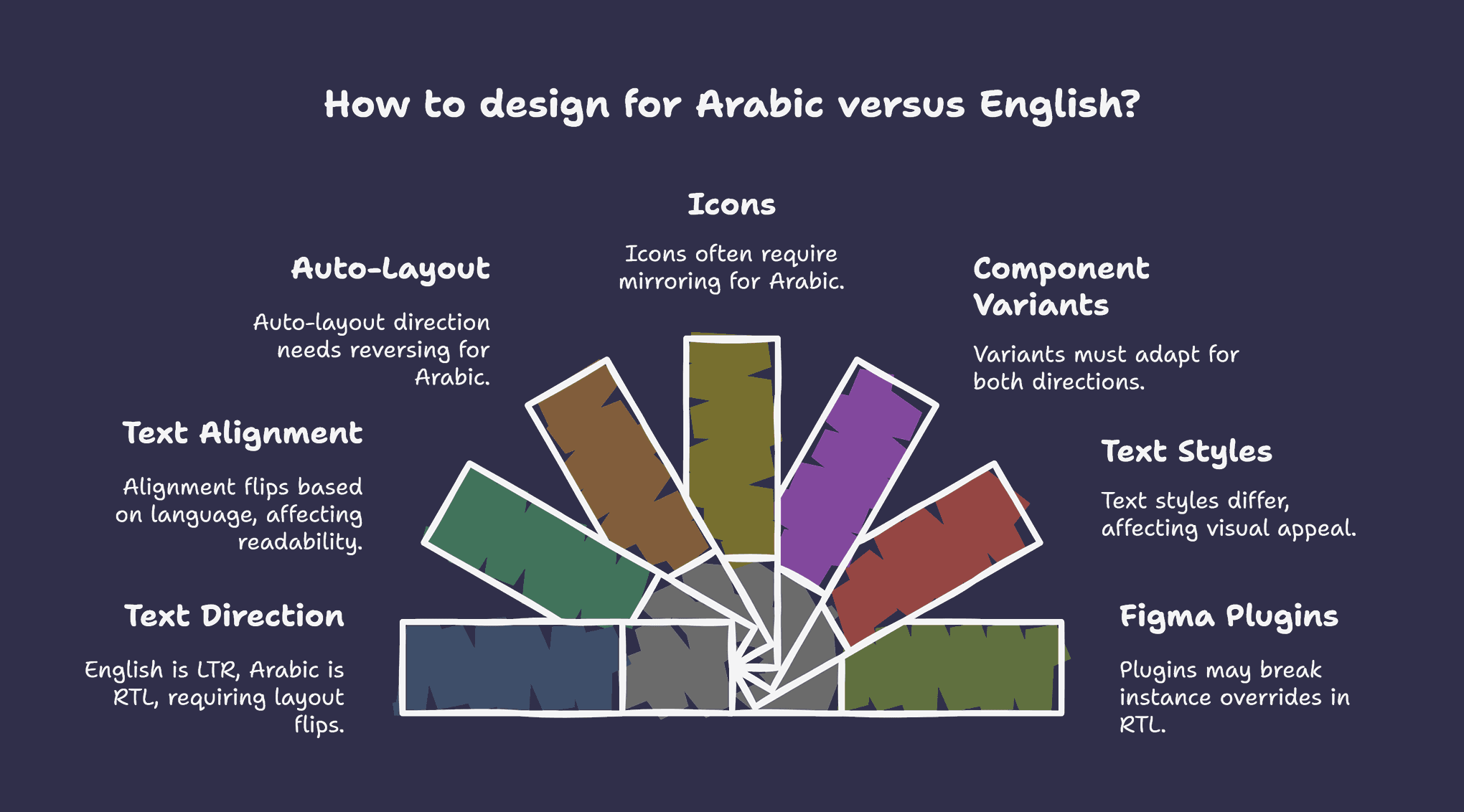
Most existing localization plugins either oversimplify the problem or break core elements of the design system.
I wanted to create a tool that solves the entire workflow holistically, not just translation.
4- Competitive Analysis: Why Existing Tools Fail at the System Level
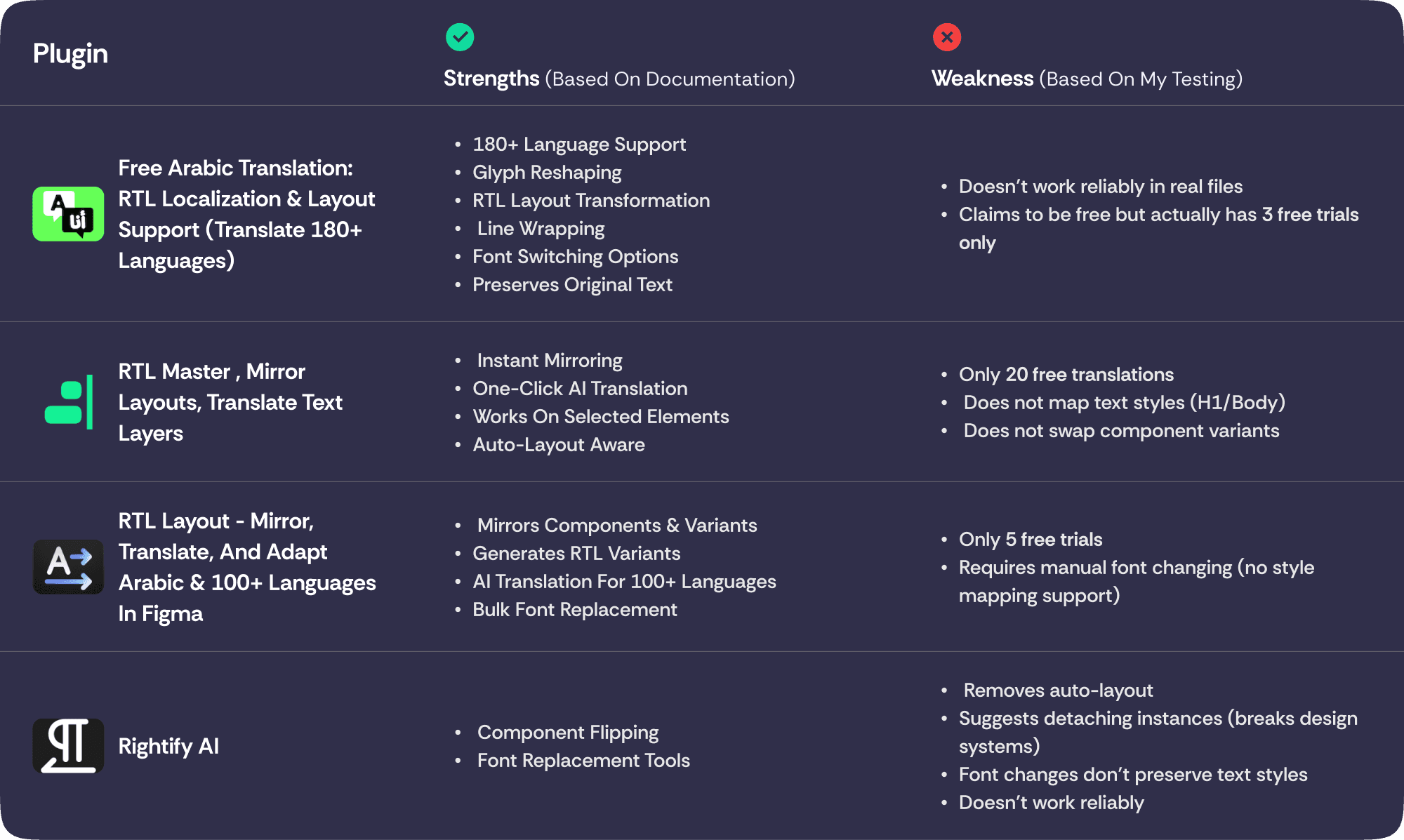
Before designing, I analyzed the existing localization plugin landscape. There were several competitors, but each solved the problem in fragmented ways:
The Pattern Across Competitors:
Translation-focused tools handled text conversion elegantly but ignored layout direction—designers still manually flipped icons, adjusted padding, rewrote variable names
RTL/LTR mirroring tools flipped layouts correctly but destroyed design system relationships—components detached, overrides were lost, instances became mainframes
Component swapping tools preserved structure but required manual setup—designers had to manually pair English and Arabic variants, defeating the point of automation
The Root Cause: These tools were built on a false assumption—that localization is a content operation. They treated translation and directionality as separate problems, each with its own tool.
But I realized the real issue: they didn't understand design systems. Design systems work through relationships (components depend on tokens, variants depend on overrides, instances depend on integrity). Existing tools broke these relationships the moment they tried to localize.
Rather than out-speeding competitors on "translation in seconds," I out-thought them on system design. The positioning became:
"Localization that respects your design system instead of destroying it."
This meant:
Teams using competitor tools had to choose between speed and safety
This plugin offered both—because it understood design systems fundamentally
It made design system localization a repeatable process, not a manual project
5- Research Insights & Problem Reframing
This competitive gap revealed something critical: the market was solving for speed ("fast translation") when the actual blocker was system integrity. Teams weren't slow at translating text—they were slow because they had to manually repair broken design systems afterward.
I shifted my research question: "Why do localization tools break design systems, and what would it take to localize without destruction?"
6- Design Process: Non-Destructive Localization as a System Principle
This reframed the entire solution philosophy. Instead of competing on speed ("fastest translation"), the principle became: "Transform the content and layout while preserving the system's integrity."
This positioned the plugin not as a faster alternative to existing tools, but as a fundamentally different category—a design system preservation tool that happens to localize.
Key UX Decisions were built around this principle:
Automatic translation with semantic awareness (not just text replacement—understanding style hierarchy, so headings stay distinguished from body text across languages; where competitors treat all text the same)
Intelligent style mapping respecting design tokens (RTL Arabic uses different font sizes/weights than English; honor system conventions instead of overriding them like competitors do)
Safe override handling (if a designer customized a component instance, localization honors that choice—doesn't erase it, which is what happens when competitors detach instances)
Reversible operations (every action can be undone; localization becomes iterative, not destructive—competitors force one-way operations)
Zero instance corruption (the critical difference: components remain connected to their main, variants stay linked, overrides preserved—competitors break this the moment they operate on a component)
User Flow:
I mapped three main flows:
1- Translate English → Arabic.
2- Translate Arabic → English.
3- Swap the entire layout between LTR ↔ RTL.
Each needed to be instant, safe, and reversible.
Visual Design:
Created:
Plugin icon (simple, two-directional arrows representing EN ↔ AR flow)
Hero image featuring core features
Clean UI matching Figma’s native plugin style
7- Building the Plugin (with AI Collaboration)
I collaborated heavily with Claude, ChatGPT & Gemini to:
Scaffold the translation engine.
Implement text-style mapping logic.
Handle RTL/LTR conversion.
Debug issues (including Figma API breaking changes).
Ensure instance overrides weren’t overwritten.
Build intelligent variant switching.
This hybrid workflow allowed me to stay focused on UX logic while rapidly iterating through technical challenges.
8- UX Testing & Iteration
I tested the plugin on:
Websites with component variants.
Individual Components.
During these tests, I encountered several real-world issues that required refinements to ensure the plugin was stable, fast, and production-ready.
Key Refinements from Testing:
1- Figma API Breaking Change: getMainComponent → getMainComponentAsync:
While testing components and instances, Figma rolled out a significant API update that deprecated:
node.mainComponent(), node.getMainComponent()
and required all developers to migrate to the asynchronous: await node.getMainComponentAsync()
This change caused the plugin to temporarily break. I updated the entire component-handling logic to use the new async API and redesigned internal flows to ensure:
1- No race conditions.
2- No lost overrides.
3- No blocking of other actions in the UI.
4- Stable performance across large documents.
This was a critical compatibility fix to keep the plugin functional under the updated Figma API.
2- MyMemory API “Free Tier” Constraint (5000 chars/day)
The plugin originally translated text in large batches using parallel requests. During testing, I discovered a hidden limitation in the MyMemory Translation API: Free, anonymous usage is limited to only 5000 characters per day.
This caused some translations to silently fail or return incomplete results.
To accommodate this limitation without requiring users to buy an API key, I redesigned the architecture of the translation flow:
Implemented delayed batch processing.
Added intelligent throttling between requests.
Reduced payload sizes per request.
Implemented automatic retries when rate limits are hit.
Added graceful fallbacks to preserve UX quality.
This restructuring ensured that even users on the free tier could successfully translate full design files by spacing out API calls efficiently—keeping the plugin usable at zero cost.
9- Final Outcome: Strategic Impact
By solving this at the system level—and making the differentiation clear—the plugin unlocked several benefits that go beyond "faster translation":
For Design Teams:
Localization became a repeatable, trustworthy process—reducing the cognitive load of "did we break something?"
Design system principles now apply to multilingual work, not just single-language design
Teams could experiment with localization without fear of system corruption
The plugin became a defense against the design system fragmentation other tools introduced
For Product Teams:
Handoff clarity improved—devs could trust the design was correct, not a preliminary sketch requiring rework
Market expansion became a design capability, not an engineering constraint
RTL-first thinking (often an afterthought) became part of the design process
Competitive advantage: teams using this tool could localize faster and safer than teams using existing tools
For Design Community:
Released as a free, open Figma plugin—democratizing good localization practice
Adopted by hundreds of designers (+200), recognized as solving a problem competitors couldn't
10. Learnings & Reflections
This project crystallized a core principle: The best competitive advantage isn't speed—it's understanding the system better than competitors.
When I analyzed why existing tools failed, I didn't see feature gaps. I saw a conceptual gap: they treated localization as a content problem when it's actually a systems problem. That insight led to a fundamentally different architecture that competitors couldn't easily copy.
11- Conclusion
This plugin demonstrates my ability to bring complex product ideas to life—from research and UX architecture to interaction design, technical logic, and iterative refinement.
It embodies what I value as a designer: empathy for real workflows, respect for design systems, and crafting tools that remove friction to empower creativity.